Turning on the Data Logger
|
Move the data logger to the survey area.
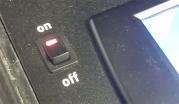
Turn on the data logger by turning the switch located on the side of the unit to the “ON” position. |
Power Switch in “ON” Position |
|
The data logger will turn on. The touch screen will start. After a few minutes, the main Color SDS Touch Screen menu will appear. Ensure that there are no error messages on the screen after one minute of operation. |
|